
Improving Information and Document Governance in Financial Services
Financial services businesses hold sensitive client information across multiple systems. LOOKUP helps firms create a governed, searchable and structured information environment — one that supports collaboration, compliance, security and AI readiness without becoming a document management burden.
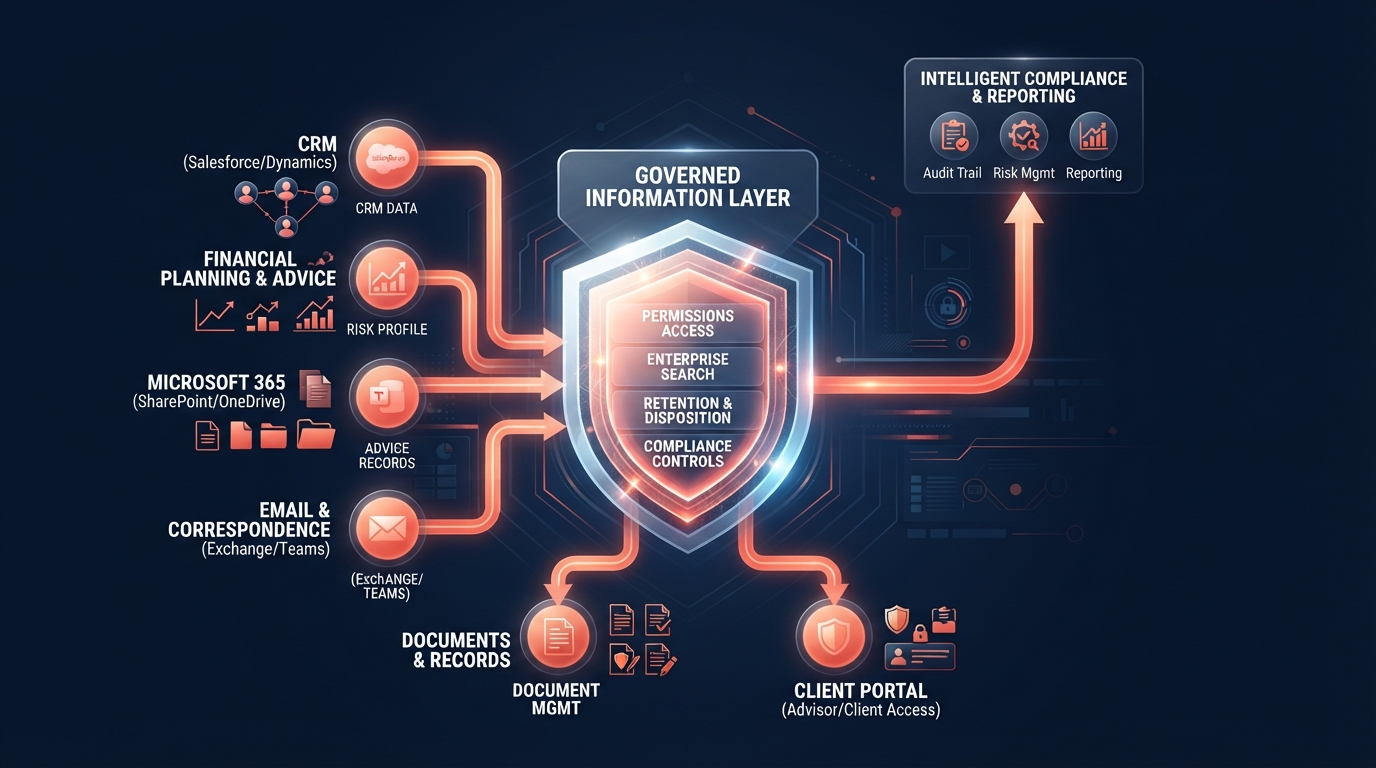
The short answer
How should a financial services business manage client information and documents? By creating a governed information environment with clear authoritative systems, consistent ownership, appropriate permissions, searchable structure, controlled sharing, lifecycle governance and reliable retrieval.
Financial services information typically exists across CRM, practice or advice platforms, Microsoft 365, email, SharePoint, OneDrive, client portals, document systems, accounting and other SaaS applications. Without governance, information becomes fragmented, duplicated and difficult to find — and permissions accumulate over time until access no longer reflects actual business responsibility.
The objective is not simply to move files to SharePoint. It is to create an information architecture where documents are easy to find, appropriately protected, consistently structured, easy to collaborate on, governed throughout their lifecycle and ready to support future automation and AI.
Why information becomes fragmented
Information fragmentation is rarely deliberate. It accumulates as businesses grow, adopt new systems and adapt to changing workflows. Common causes include:
Email as a repository
Client documents stored in inboxes rather than governed systems.
Local file storage
Staff saving files to desktops or local drives instead of shared systems.
Multiple cloud applications
Each SaaS platform creating its own information silo.
Specialist systems
CRM, advice platforms and practice systems each holding different information types.
Duplicate documents
The same document stored in email, SharePoint and a local folder.
Inconsistent practices
Different teams organising information differently.
Define authoritative systems
Not every system should become the system of record. A financial services business should define which platform is authoritative for each information type — and ensure staff understand where information belongs.
For example, the CRM may be authoritative for client relationships and contact details. A practice or advice platform may be authoritative for advice records and compliance files. SharePoint may be authoritative for collaborative documents and internal knowledge. Email is communication, not a record system.
Defining authoritative systems reduces duplication, clarifies ownership and makes it easier for staff to find the right information in the right place — rather than searching across email, drives and multiple platforms.
Client-centric information architecture
Financial services information should be organised around the entities the business actually works with — clients, relationships, services, records, documents and communications. The precise structure should reflect how the firm operates, not an arbitrary filing model.
Client
The person or entity the business serves.
Relationship / Service
The service or relationship type linking the client to the business.
Record
Authoritative records — advice, compliance, application or service records.
Document
Supporting documents — correspondence, forms, statements and evidence.
Communication
Email, meeting notes and client interactions.
Workflow
The processes that create, move and use information.
Retention
How long information is kept and when it is disposed of.
Sensitivity
The protection level appropriate for each information type.
This page does not prescribe a universal folder structure. The right architecture depends on the firm's systems, workflows, regulatory obligations and service model.
CRM, specialist systems and Microsoft 365
Financial services businesses commonly use CRM, practice or advice platforms, document management systems, accounting and Microsoft 365. These systems play complementary roles — and information governance should span all of them, not just one.
The CRM may hold client relationships and contact data. A practice platform may hold advice records and compliance files. Microsoft 365 — SharePoint, Teams and OneDrive — may hold collaborative documents, internal knowledge and communication. Each system has a role, and the objective is to improve the workflow between them rather than force every information type into a single platform.
LOOKUP does not recommend replacing specialist financial-services software unnecessarily. The right approach is to define which system is authoritative for each information type, then improve integration, permissions and governance across the ecosystem.
SharePoint and financial-services information
According to official Microsoft documentation, SharePoint provides document libraries, metadata, permissions, version history, external sharing controls and retention policies. When properly configured, SharePoint can serve as a governed collaboration and document layer for financial services businesses.
However, SharePoint does not automatically satisfy regulatory recordkeeping obligations. Firms should review their specific obligations and configure retention, permissions and information protection accordingly. Poorly governed SharePoint can create oversharing risk — broad permissions inherited across sites and libraries may expose sensitive information more widely than intended.
Learn how LOOKUP helps financial services businesses optimise Microsoft 365 →
Email should not become the only information repository
Email is a communication tool, not a record system. When client documents, advice records and service information live primarily in inboxes, the business loses visibility, governance and control.
Email is difficult to search, govern, secure and retain. Attachments create duplicate copies. When staff leave, their mailbox goes with them. And when a client asks for a document, staff often cannot find it without searching through months of correspondence.
The objective is not to eliminate email — it is to ensure that authoritative information lives in governed systems, with email used for communication and linking rather than storage.
Version control and authoritative records
Version uncertainty is one of the most common information problems in financial services businesses. When documents are emailed as attachments, multiple copies circulate and staff cannot identify which version is current. This creates risk — particularly for advice documents, compliance records and client agreements.
Co-authoring, version history and controlled review within governed systems — SharePoint, a specialist DMS or a practice platform — reduce version uncertainty. Linking to documents rather than attaching them ensures everyone works from the current version.
The business objective is to reduce uncertainty over which document is authoritative — not to eliminate human error entirely, but to create an environment where the authoritative version is clear.
Permissions and sensitive information
Permissions accumulate over time. Staff change roles, take on new responsibilities and leave the business — but their access is not always reviewed or reduced. Broad, inherited permissions create unnecessary risk and make it harder to demonstrate appropriate information governance to clients, insurers and regulators.
Financial services businesses should implement least-privilege access, review permissions regularly, and manage joiners, movers and leavers promptly. Sensitive client information may require additional access restrictions beyond standard permissions.
For deeper guidance on protecting client information through identity, access and governance controls, see our guide to protecting client information in a financial services business.
Secure client collaboration
Financial services businesses need to share information with clients — documents, advice, statements and correspondence. The method of sharing matters as much as the information itself.
Controlled sharing
Governed SharePoint external links with appropriate expiry and permissions.
Guest access
Authenticated guest access with tracked, time-limited permissions.
Client portals
Dedicated portals with identity verification and access controls.
Identity controls
Ensure external users are identified before accessing sensitive information.
Email alternatives
Replace email attachments with secure links to governed documents.
Audit visibility
Track who has accessed shared information and when.
The right approach depends on the firm's systems, risk profile and client requirements. Not every client needs portal access — but every client should have a secure way to receive and share sensitive information.
Retention and disposal
Information retention is a governance issue, not just a storage issue. Keeping information longer than necessary increases risk and clutter; disposing of it too early may breach regulatory or professional obligations.
Retention requirements differ by entity type, licence, activity, record type and regulatory regime. A financial advice practice, a credit business, an APRA-regulated entity and a mortgage broker may all have different retention obligations. There is no single universal retention period for all financial services businesses.
Businesses should confirm their specific retention obligations with appropriate professional advisers and configure retention and disposal policies accordingly. This page does not prescribe retention periods and is not legal, regulatory or compliance advice.
Information governance is an AI-readiness issue
AI tools such as Microsoft 365 Copilot work within a user's existing permissions. According to official Microsoft documentation, Copilot accesses information based on the user's existing Microsoft 365 permissions.
This means that information governance directly affects AI usefulness and risk. If information is poorly structured, permissions are overly broad or documents are scattered across ungoverned locations, AI may produce less useful results and increase the risk of oversharing. Good governance — permissions, quality, authority, structure and searchability — is a prerequisite for effective AI adoption.
For a broader treatment of AI readiness for financial services businesses, see our Preparing a Financial Services Business for AI Business Outcome.
Information governance improves workflow
Information governance and workflow efficiency are connected. When information is structured, searchable and governed, staff spend less time searching, duplicating and re-keying — and more time on client service and advice.
For guidance on reducing administrative friction through better workflows and automation, see our guide to reducing administrative overhead in a financial services business.
For guidance on structuring the client onboarding journey with secure information collection, see our guide to improving client onboarding and service workflows.
How this maps to the LOOKUP Business Modernisation Framework™
Information and document governance is not a one-off project. It follows the same structured approach as every LOOKUP engagement.
Map where client information and documents currently live across all systems.
Review permissions, access controls and sensitive information protection.
Address legacy storage and improve Microsoft 365 foundations.
Create consistent information architecture, naming and filing practices.
Reduce duplicate information, improve search and streamline workflows.
Establish governance for automation and AI readiness.
Migrate and deploy information structures deliberately with training.
Review usage, permissions, searchability and governance continuously.
Understand the current environment
Protect identities, devices and information
Remove legacy technology constraints
Create consistent systems and processes
Improve workflows and productivity
Establish governance and AI readiness
Introduce technology deliberately
Measure, review and continuously improve
Understand the current environment
Protect identities, devices and information
Remove legacy technology constraints
Create consistent systems and processes
Improve workflows and productivity
Establish governance and AI readiness
Introduce technology deliberately
Measure, review and continuously improve
What success looks like
Strong information and document governance creates qualitative business outcomes — not just a tidier filing system.
Easier Information Retrieval
Staff can find the right document quickly without searching multiple systems.
Clearer Authoritative Records
Each information type has a known system of record, reducing version uncertainty.
Controlled Access
Sensitive client information is accessible only to those who need it.
Less Duplication
Documents are stored once in the right location, not copied across email and drives.
Better Client Collaboration
Secure, governed sharing replaces ad-hoc email attachments.
Stronger AI Foundations
Structured, governed information is better positioned for AI discovery.
Clearer Information Ownership
Every information area has a clear owner and governance responsibility.
Research and regulatory context
The Australian Securities and Investments Commission (ASIC) provides guidance on cyber resilience for financial services licensees, including expectations around information security and governance.
The Office of the Australian Information Commissioner oversees the Privacy Act and the Notifiable Data Breaches scheme. Whether these obligations apply depends on the organisation, the information held and the business activities undertaken.
The Australian Prudential Regulation Authority (APRA) publishes prudential standards on information security applicable to APRA-regulated entities. CPS 234 does not apply to every financial adviser or financial-services business.
Microsoft's official documentation details SharePoint permissions, sharing and information governance capabilities. Microsoft Purview provides information protection capabilities including sensitivity labels, data loss prevention and information classification — with capabilities dependent on configuration and licensing.
See how information governance connects to AI readiness for financial services businesses →
For broader guidance on cyber security, recovery and operational resilience, see our guide to strengthening cyber and operational resilience in financial services.
For industry-specific technology guidance, see our Financial Services industry page.
What this could look like in practice
For example, a financial services business might encounter the following challenges and work through them using a structured technology approach.
Business challenge
A growing financial advice practice has client information across a CRM, a practice platform, email, a shared drive, SharePoint and local folders. Different teams organise documents differently. Permissions are broad and inherited. External sharing is inconsistent. There is no agreed information architecture or retention policy. Staff struggle to find the right document quickly.
Structured approach
Discover where information lives. Define authoritative systems. Design a client-centric information architecture. Secure permissions and sharing. Standardise naming and structure. Migrate deliberately with clean-up. Govern retention and disposal. Prepare for AI by improving permissions and information quality.
Potential business outcomes
- • More consistent document handling across the practice
- • Better searchability and faster information retrieval
- • Reduced unnecessary access to sensitive client information
- • Improved client collaboration through governed sharing
- • Less duplication and version uncertainty
- • Better foundations for automation and AI adoption
- • Clearer information ownership and governance
Frequently asked questions
How should financial services businesses manage documents?
Financial services businesses should manage documents through a combination of clear authoritative systems, consistent information architecture, appropriate permissions, controlled sharing, lifecycle governance and reliable retrieval. The objective is not simply to store files but to create a governed information environment where the right people can find the right information securely.
What is information governance?
Information governance is the framework of policies, processes, permissions and controls that determine how information is created, stored, shared, retained and disposed of. It covers who can access information, where it lives, how long it is kept and how it is protected throughout its lifecycle.
What is a system of record?
A system of record is the authoritative platform where a particular type of information is maintained. For financial services businesses, the CRM may be the system of record for client relationships, a practice platform for advice records, and SharePoint for collaborative documents. Not every system should become the system of record — defining which system is authoritative for each information type reduces duplication and confusion.
Can financial advisers use SharePoint?
SharePoint can support document collaboration, secure sharing and information governance for financial services businesses when properly configured. However, SharePoint should complement — not necessarily replace — specialist advice platforms, CRM systems or practice management software. The right approach depends on the firm's systems, workflows and regulatory obligations.
Can SharePoint replace a specialist advice platform?
Not necessarily. Specialist advice platforms often provide regulatory-specific functionality — compliance workflows, advice templates, recordkeeping and audit trails — that SharePoint does not replicate. SharePoint can serve as a governed collaboration and document layer, but the firm's specialist systems may remain the authoritative record for regulated activities.
What is the difference between SharePoint and OneDrive?
SharePoint is designed for team and organisational document collaboration with structured permissions, metadata and governance. OneDrive is designed for individual file storage and personal sharing. Financial services businesses should use SharePoint for shared client and business documents, and OneDrive for personal working files — not as a primary repository for client information.
How should client documents be organised?
Client documents should be organised around the way the business actually works — typically by client, relationship or service, document type, status and sensitivity. The precise structure should reflect the firm's workflows, not an arbitrary folder hierarchy. Consistent naming, metadata and ownership are as important as the folder structure itself.
Should client records be stored in email?
Email should not become the primary repository for client records. Email is difficult to search, govern, secure and retain. Client records should be stored in governed systems — practice platforms, SharePoint, CRM or document management systems — with email used for communication, not storage.
How should document versions be managed?
Document versions should be managed through co-authoring, version history and controlled review processes within governed systems. Emailing attachments creates version uncertainty — multiple copies circulate and staff cannot identify the authoritative version. Linking to documents in SharePoint or a specialist platform reduces duplication and ensures everyone works from the current version.
How should sensitive information be shared?
Sensitive information should be shared through controlled methods — governed SharePoint external links with appropriate expiry, authenticated guest access or dedicated client portals. Anonymous public links should be avoided for sensitive client information. Sharing methods should reflect the firm's risk profile, client requirements and information governance policies.
How long should financial-services records be retained?
Retention periods depend on the entity type, licence, activities, record type and applicable regulatory regime. There is no single universal retention period for all financial services businesses. Firms should confirm their specific obligations with appropriate professional advisers and configure retention policies accordingly.
Does one retention period apply to all financial businesses?
No. Retention requirements differ by entity type, licence, activity and regulatory regime. A financial advice practice, a credit business, an APRA-regulated entity and a mortgage broker may all have different retention obligations. Businesses should obtain professional advice regarding their specific requirements rather than assuming a universal standard.
How does information governance affect AI?
AI tools such as Microsoft 365 Copilot work within a user's existing permissions. If information is poorly structured, permissions are overly broad or documents are scattered across ungoverned locations, AI may produce less useful results and increase oversharing risk. Good information governance — permissions, structure, quality and authority — is a prerequisite for effective AI adoption.
Should information be cleaned before migration?
Yes. Migration is an opportunity to improve information management, not merely relocate existing disorder. Before migrating, review duplicates, remove obsolete files, review permissions, agree on naming and structure, and assign ownership. Migrating poor architecture into a modern platform leaves the same problems in a new location.
Where should a financial services business start?
Start by mapping where client information currently lives — across CRM, practice platforms, Microsoft 365, email, shared drives and local folders. Identify duplicates, broad permissions and ungoverned sharing. Define which system is authoritative for each information type. Then build a practical plan to standardise structure, improve permissions and migrate deliberately.
What business leaders should do next
To bring information governance into a coordinated technology strategy, see our guide to building a technology roadmap for a financial services business.
Executive guides
Business Modernisation Framework™
The eight-stage methodology guiding every LOOKUP engagement.
Business Technology Roadmap
Build a practical technology roadmap aligned with long-term business goals.
AI Governance
Practical guidance for responsible AI adoption, policies and oversight.
Microsoft Copilot Readiness
Prepare Microsoft 365 for secure and successful Copilot adoption.
Preparing for AI
Governance, information and security foundations for AI adoption.
Protecting Client Information
Identity, access and cyber security around sensitive client information.
How LOOKUP can help
LOOKUP helps financial services businesses understand their current information environment, design better document structures, improve Microsoft 365 governance, strengthen permissions, improve collaboration, integrate workflows, prepare information for AI and develop a practical technology roadmap.
Sources & Further Reading
Australian Securities and Investments Commission
Cyber Security Guidance
ASIC guidance on cyber resilience and information security for financial services licensees.
View SourceOffice of the Australian Information Commissioner
Australian Privacy Principles Guidelines
Guidance on privacy obligations relevant to collecting, storing and handling client information.
View SourceMicrosoft
SharePoint Online Sharing and Permissions
Official documentation on secure external sharing, permission management and information governance in SharePoint.
View SourceMicrosoft
Microsoft Purview Information Protection
Official documentation on data classification, sensitivity labels and information protection within Microsoft 365.
View SourceMicrosoft
Microsoft 365 Copilot Documentation
Official documentation on how Copilot works within Microsoft 365 permissions and information environments.
View SourceAustralian Prudential Regulation Authority
Information Security — CPS 234
APRA prudential standard on information security applicable to APRA-regulated entities — not universal for all financial services businesses.
View SourceAustralian Cyber Security Centre
Essential Eight Explained
Recommended baseline of mitigation strategies for reducing cyber risk, relevant to information protection.
View SourceEvidence Standard: LOOKUP references recognised industry, government, professional and technology sources when discussing research, regulation and industry trends. Research findings are paraphrased and linked to their original sources wherever practical. LOOKUP's professional observations and recommendations are presented separately from third-party research.
This page provides business technology and governance information and is not legal, privacy, financial, regulatory or compliance advice. Organisations should obtain appropriate professional advice regarding their specific obligations.
Turn Business Information Into a Governed Business Asset
LOOKUP helps financial services businesses improve information and document governance, strengthen Microsoft 365, reduce administrative friction and build better foundations for secure automation and AI.