
Strengthening Cyber Security in an HVAC & Mechanical Services Business
HVAC and mechanical services businesses hold customer information, use mobile devices across field teams, and increasingly connect to building systems. Strong cyber security protects operations, client trust and recovery capability — across both the business IT environment and connected building systems where relevant.
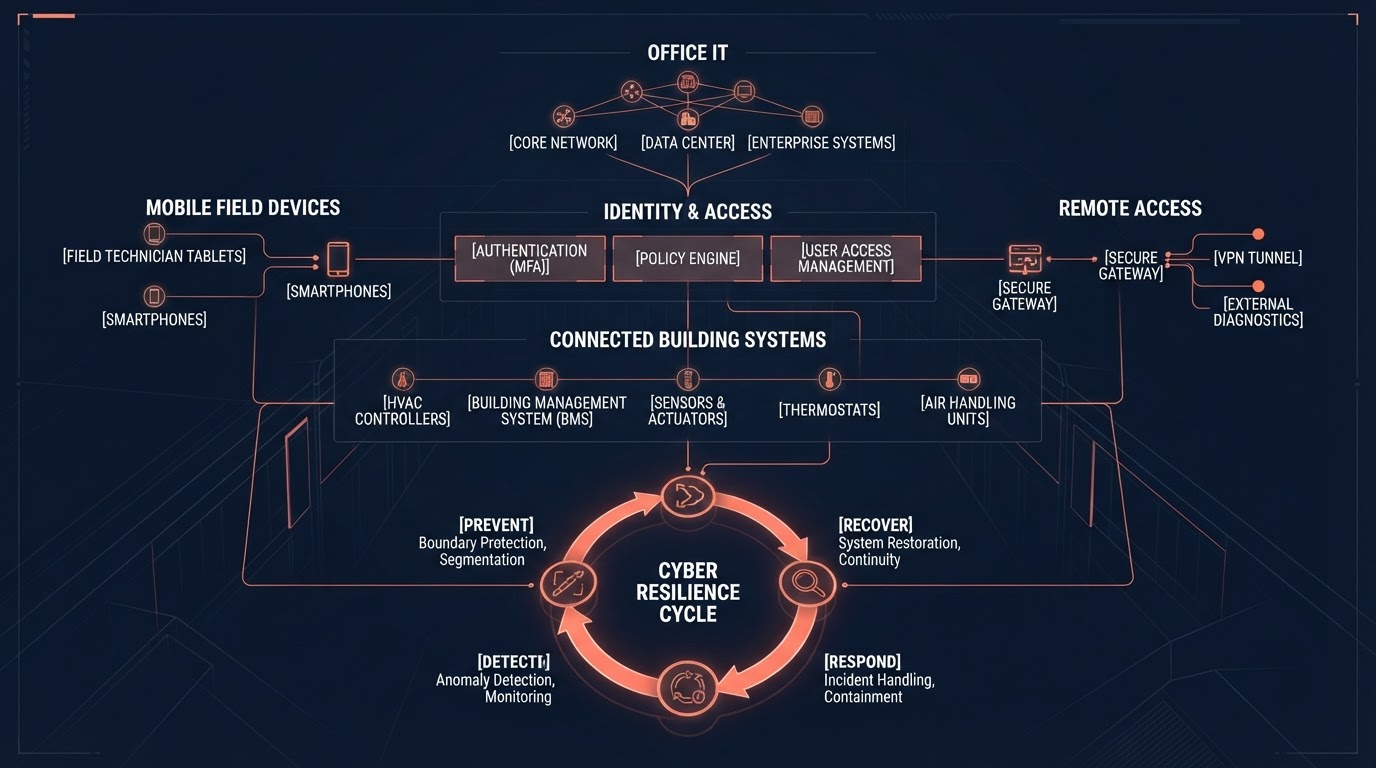
The short answer
An HVAC and mechanical services business should strengthen cyber security across identity, devices, email, Microsoft 365, field-service applications, backup and recovery, and incident response. Foundational controls include Multi-Factor Authentication, individual accounts instead of shared credentials, device management for mobile technicians, email security, and tested recovery capability.
Some HVAC contractors also install, access or support connected HVAC equipment, building management systems or other operational technology. Where this applies, security considerations extend beyond office IT to include remote access, default credentials, network segmentation and vendor access.
The objective is not to eliminate all risk — that is impossible — but to reduce unnecessary exposure, improve detection and recovery, and build a more resilient business. Strong cyber security supports business continuity, client trust and safer foundations for AI adoption.
Approximately $56,600 average cost per small business report
The Australian Signals Directorate reported an average self-reported cybercrime cost of approximately $56,600 per report for small Australian businesses in its Annual Cyber Threat Report 2024–25. These are Australian business statistics — not specific to HVAC businesses — and represent risk exposure rather than expected savings from security investment.
Start with business IT security
Before addressing specialised or connected-system security, an HVAC business should ensure its core business IT environment is well protected. This includes Microsoft 365, email, laptops, mobiles, accounting systems, field-service platforms, customer information and cloud applications.
Most cyber incidents affecting small and medium businesses involve compromised credentials, phishing, unpatched systems or weak recovery practices. Strengthening these foundational areas reduces the majority of avoidable risk before considering more specialised threats.
Identity and MFA
Identity is the modern security perimeter. Every user should have an individual account with a unique credential, and Multi-Factor Authentication should be enabled across Microsoft 365, email, field-service platforms and any application that supports it.
As a practical security baseline, LOOKUP recommends enforcing MFA across user accounts, with any necessary technical exceptions formally assessed and appropriately controlled. Conditional Access policies — where available through Microsoft 365 licensing — can further restrict access based on location, device state or risk signals.
Access reviews should be conducted regularly to identify dormant accounts, former staff, changed roles and accumulated privileges. Identity hygiene is ongoing, not a one-off project.
Shared accounts create avoidable risk
Shared accounts — where multiple staff use the same login — reduce individual accountability, make it difficult to remove access when someone leaves, and increase the risk of credential exposure. They are common in field-service businesses where speed has historically been prioritised over security.
LOOKUP recommends moving to individual accounts for every user, with administrative access restricted to dedicated admin accounts that are separate from daily-use accounts. This improves auditability and significantly reduces the blast radius of a compromised credential.
Mobile technicians expand the security boundary
HVAC businesses operate across multiple sites, with technicians using phones, tablets and laptops to access job information, communicate with the office and complete documentation. Each device is a potential access point to business systems and customer information.
Device management should include screen locks, encryption, remote wipe capability, regular security updates and application authentication. Lost or stolen devices should be reportable and remediable quickly. Where practical, devices should be enrolled in a mobile device management platform rather than left unmanaged.
Remote work and field access are essential to HVAC operations — but they should not mean uncontrolled access. The same identity and access principles that protect the office environment should extend to every device that touches business data.
Email and business email compromise
Email remains one of the most common channels for cyber attacks against Australian businesses. Business email compromise — where criminals gain access to or impersonate a business email account to deceive staff, customers or suppliers — can result in significant financial and reputational harm.
HVAC businesses should be particularly cautious about payment redirection requests, supplier bank detail changes and urgent financial instructions received via email. Payment changes should be verified through a secondary communication channel — such as a phone call to a known contact number — before any action is taken.
The Australian Cyber Security Centre provides guidance on identifying and preventing business email compromise that is directly relevant to Australian businesses.
Field-service and cloud applications
Field-service platforms, accounting systems, CRM tools and cloud applications each have their own user management, admin roles and security settings. These should be reviewed alongside Microsoft 365 rather than treated as separate concerns.
Key areas to assess include user lifecycle (joiners, movers, leavers), administrative roles, MFA where supported, API credentials, integration access and third-party vendor access. An integration that connects a field-service platform to accounting software is a security boundary — it should be reviewed and documented.
Not every platform supports the same security controls. Businesses should understand what is available and supplement with device management, individual accounts and access reviews where MFA or Conditional Access is not supported.
Microsoft 365 security
Microsoft 365 is central to most HVAC businesses' operations — email, file storage, communication and collaboration. Securing it well reduces a significant proportion of common cyber risk.
Key areas include MFA for all users, Conditional Access policies where available, restricted administrative roles, external sharing controls, email protection through Microsoft Defender, and regular review of Microsoft Secure Score. The specific controls available depend on licensing, so businesses should verify capabilities against their subscription.
Microsoft publishes official security documentation that explains available controls by licence tier. LOOKUP's recommendations supplement — but do not replace — this guidance.
Backup and recovery
A backup that has never been tested is an assumption, not a verified capability. The key question is not simply whether backups exist, but whether the business can recover its critical information within the timeframe it needs.
Businesses should assess backup and recovery requirements for business-critical Microsoft 365 information, including appropriate separation from the production environment and regular restore testing based on the firm's recovery objectives. Cloud platforms may have redundancy, but redundancy is not the same as recoverable backup.
For organisations where Microsoft 365 information is business-critical, LOOKUP generally recommends evaluating independent backup and recovery capabilities as part of the firm's broader business continuity strategy. The specific architecture should reflect the business's recovery objectives — not a universal standard.
Incident response
Cyber incidents are not a matter of if, but when. An incident response plan helps the business respond quickly and reduce damage when something goes wrong. The plan does not need to be complex, but it should answer key questions before an incident occurs.
The plan should identify who makes decisions, who contacts the insurer or broker, who engages technical responders, who manages communications, and where the plan is stored. An incident response plan that has never been exercised is theoretical — testing it builds real readiness.
The Essential Eight
The Essential Eight is a set of baseline cyber security controls published by the Australian Cyber Security Centre. It covers application control, patching, Microsoft Office macro controls, user application hardening, restricting administrative privileges, operating system patching, multi-factor authentication and regular backups.
The Essential Eight is not a universal legal requirement for every private HVAC business. However, LOOKUP recommends it as an effective operational baseline for strengthening cyber security. Some contractual, insurance or regulatory contexts may reference it, so businesses should confirm requirements with their insurer, broker or relevant parties.
Learn more about how LOOKUP implements these controls on our Essential Eight Services page.
Connected HVAC, BMS and operational technology
Some HVAC and mechanical services contractors install, access or support connected HVAC equipment, building management systems (BMS) or other operational technology (OT). Where this applies, security considerations can extend beyond normal office IT.
Connected-system security may involve reviewing remote access methods, replacing default or shared credentials, segmenting building networks from office networks, managing vendor access, ensuring supported software and firmware, and clarifying who is responsible for monitoring and patching.
The Australian Cyber Security Centre and NIST publish guidance on securing operational technology that is relevant where connected building systems are in scope. However, not every HVAC contractor operates or manages OT — this section applies only where the business genuinely installs, accesses or supports connected systems.
LOOKUP does not automatically manage specialised OT without assessment. Where connected-system security is relevant, it should be assessed in the context of the specific equipment, contractual relationships and operational environment.
IT and OT responsibilities need to be clear
When an HVAC business accesses or supports connected building systems, responsibility for security is rarely held by a single party. It may involve the customer, building owner, facilities manager, HVAC contractor, BMS vendor, IT provider, security provider and equipment manufacturer.
Responsibilities vary depending on the contractual relationship, the type of system and the scope of services provided. They should be clearly documented in contracts and service agreements — not assumed.
LOOKUP does not prescribe universal contractual obligations. Businesses should obtain appropriate professional advice regarding their specific responsibilities when accessing or supporting connected building systems.
How this maps to the LOOKUP Business Modernisation Framework™
Cyber security for HVAC businesses follows the same structured methodology that guides every LOOKUP engagement. Learn more about the Business Modernisation Framework™.
Map the current technology environment, access points and connected systems.
Strengthen identity, MFA, device security and administrative access controls.
Address unsupported systems, legacy devices and outdated security configurations.
Create consistent security policies across office, field and mobile environments.
Improve monitoring, access reviews and recovery testing practices.
Establish governance, incident response and vendor access management.
Deploy security improvements, training and connected-system controls where relevant.
Review security posture, test recovery and continuously strengthen defences.
What success looks like
Successful cyber security is measured by improved resilience — not by the number of security products deployed.
Individual accounts with MFA reducing the risk of credential compromise.
Mobile and field devices managed, updated and secured appropriately.
Reduced shared accounts and documented access across systems.
Backup and recovery tested against business continuity needs.
Monitoring and logging across Microsoft 365 and key applications.
Individual accountability replacing generic credentials.
Understood boundaries between business IT and customer OT environments.
Research and authoritative guidance
The Australian Cyber Security Centre publishes the Essential Eight as a baseline maturity framework for improving cyber resilience across Australian organisations. Its guidance on operational technology is relevant where HVAC contractors install or support connected building systems.
The Office of the Australian Information Commissioner provides guidance on privacy obligations relevant to handling customer and operational information. Microsoft publishes official documentation on securing Microsoft 365, including identity, Conditional Access and device management.
These organisations do not prescribe a single approach for every business. LOOKUP's recommendations are presented separately from third-party guidance and should be assessed against the organisation's operational, safety, privacy, contractual and regulatory responsibilities.
What this could look like in practice
For example, a growing HVAC and mechanical services contractor might use Microsoft 365, a field-service platform and a range of mobile devices across its technician workforce. Shared credentials have accumulated historically. MFA is enabled on some accounts but not all. Administrative access is poorly documented. Backup jobs exist but recovery has not been recently tested. The business has remote access to some customer building systems. There is no documented incident response plan.
A structured approach might involve:
Frequently asked questions
Why do HVAC businesses need cyber security?
HVAC businesses hold customer information, financial records, supplier details and operational data that can be valuable to cyber criminals. They also use email, cloud applications and mobile devices that expand the security boundary. Cyber security helps protect business operations, client trust and recovery capability — not just the office network.
Should HVAC businesses use MFA?
Yes. Multi-Factor Authentication is one of the most effective controls for reducing account compromise. LOOKUP recommends enforcing MFA across user accounts, with any necessary technical exceptions formally assessed and controlled. MFA should cover Microsoft 365, email, field-service platforms and any application that supports it.
How should technician mobile devices be secured?
Technician devices should be enrolled in a mobile device management solution where practical, with screen locks, encryption, remote wipe capability and regular security updates. Applications should be authenticated with individual accounts — not shared credentials — and MFA should be enabled where supported.
Are shared accounts a cyber risk?
Yes. Shared accounts reduce individual accountability, make it difficult to remove access when staff leave, and increase the risk of credential exposure. LOOKUP recommends individual accounts for every user, with administrative access restricted to dedicated admin accounts that are separate from daily-use accounts.
How should HVAC businesses secure Microsoft 365?
Microsoft 365 security should include MFA for all users, Conditional Access policies where appropriate, restricted administrative roles, external sharing controls, email protection and regular review of Microsoft Secure Score. The specific controls available depend on licensing, so businesses should verify capabilities against their subscription.
Do field-service applications need MFA?
Where the platform supports MFA, it should be enabled — particularly for administrative accounts. Not every field-service application offers MFA, so businesses should assess what security controls are available and supplement with device management, individual accounts and access reviews where MFA is not supported.
What is the Essential Eight?
The Essential Eight is a set of baseline cyber security controls published by the Australian Cyber Security Centre (ACSC). It covers areas such as application control, patching, macro restrictions, administrative privilege restriction, MFA, application hardening, OS patching and regular backups. It is designed as a practical maturity framework for improving cyber resilience.
Do HVAC businesses have to implement the Essential Eight?
The Essential Eight is not a universal legal requirement for every private HVAC business. However, LOOKUP recommends it as an effective operational baseline for strengthening cyber security. Some contractual, insurance or regulatory contexts may reference it, so businesses should confirm requirements with their insurer, broker or relevant parties.
Do HVAC businesses need backups?
Yes. Business-critical information — including Microsoft 365 data, customer records, job information and financial data — should be protected by a backup and recovery strategy appropriate to the business's continuity needs. Cloud platforms may have redundancy, but redundancy is not the same as recoverable backup. Businesses should understand what their platforms protect and what they do not.
What is recovery testing?
Recovery testing is the practice of verifying that backups can actually be restored within the timeframe the business needs. A backup that has never been tested is an assumption, not a verified capability. Testing should reflect realistic recovery scenarios and be scheduled based on the business's risk profile and recovery objectives.
What is business email compromise?
Business email compromise is a type of cyber attack where criminals gain access to or impersonate a business email account to deceive staff, customers or suppliers — often involving payment redirection or sensitive information requests. HVAC businesses should verify payment changes through a secondary channel and train staff to recognise suspicious email patterns.
Are connected HVAC systems a cyber-security risk?
Some HVAC and mechanical services businesses install, access or support connected HVAC equipment, building management systems (BMS) or other operational technology (OT). Where this applies, security considerations can extend beyond normal office IT. Risks may include remote access, default credentials, vendor access and network exposure. However, not every HVAC contractor operates or manages connected building systems.
What is BMS cyber security?
BMS cyber security refers to protecting building management systems — the connected platforms that control HVAC, lighting, access and other building services — from unauthorised access or disruption. For HVAC contractors who install or support BMS, this may involve secure remote access, credential management, network segmentation and coordination with building owners and IT providers.
Who is responsible for connected building-system security?
Responsibility for connected building-system security varies depending on the contractual relationship. It may involve the building owner, facilities manager, HVAC contractor, BMS vendor, IT provider, security provider or equipment manufacturer. Responsibilities should be clearly documented in contracts and service agreements. LOOKUP does not prescribe universal contractual obligations.
Where should an HVAC business start?
Start with foundational business IT security: enable MFA across all user accounts, move away from shared credentials, review administrative access, ensure devices are updated and managed, test backup recovery, and document an incident response plan. If the business installs or supports connected building systems, also review remote access and credential practices for those environments.
Related resources and services
Build security foundations before AI adoption.
Structure operational information for security and AI.
Standardise processes and reduce repetitive work.
Bring cyber security, Microsoft 365 and AI into one coordinated plan.
Industry-specific technology guidance.
Protect operational and customer information.
Implement Australia's baseline security framework.
Reliable technology support for office and field.
Secure and optimise your Microsoft 365 environment.
Strategic technology leadership for your business.
Prepare for cyber insurance discussions.
Plan security into your technology strategy.
The eight-stage methodology.
Book a strategy session.
Sources & Further Reading
Baseline cyber security guidance relevant to protecting business IT and operational systems.
View SourceGuidance on securing operational technology and industrial control systems relevant to connected building environments.
View SourceOfficial guidance on securing Microsoft 365 including identity, Conditional Access and device management.
View SourceGuidance on privacy obligations relevant to customer and operational information handling.
View SourceInternational guidance on securing operational technology environments relevant to connected building systems.
View SourceGuidance on identifying and preventing business email compromise affecting Australian organisations.
View SourceLOOKUP references recognised industry, government, professional and technology sources when discussing research, regulation and industry trends. Research findings are paraphrased and linked to their original sources wherever practical. LOOKUP's professional observations and recommendations are presented separately from third-party research.
This page provides general business technology and cyber security information and does not constitute legal, insurance or regulatory advice. Organisations should obtain appropriate professional advice regarding their specific obligations.
Stronger Cyber Security Builds a More Resilient Business
LOOKUP helps HVAC and mechanical services businesses strengthen identity, protect mobile workforces, secure Microsoft 365, test recovery and clarify connected-system responsibilities. Explore our broader technology approach for HVAC & mechanical services businesses.