
Improving Document Management in an Accounting Firm
An executive guide for accounting firm partners, directors and practice managers on how to organise, protect, find, share and govern documents as the practice grows — without simply moving everything to SharePoint and hoping for the best.
The short answer
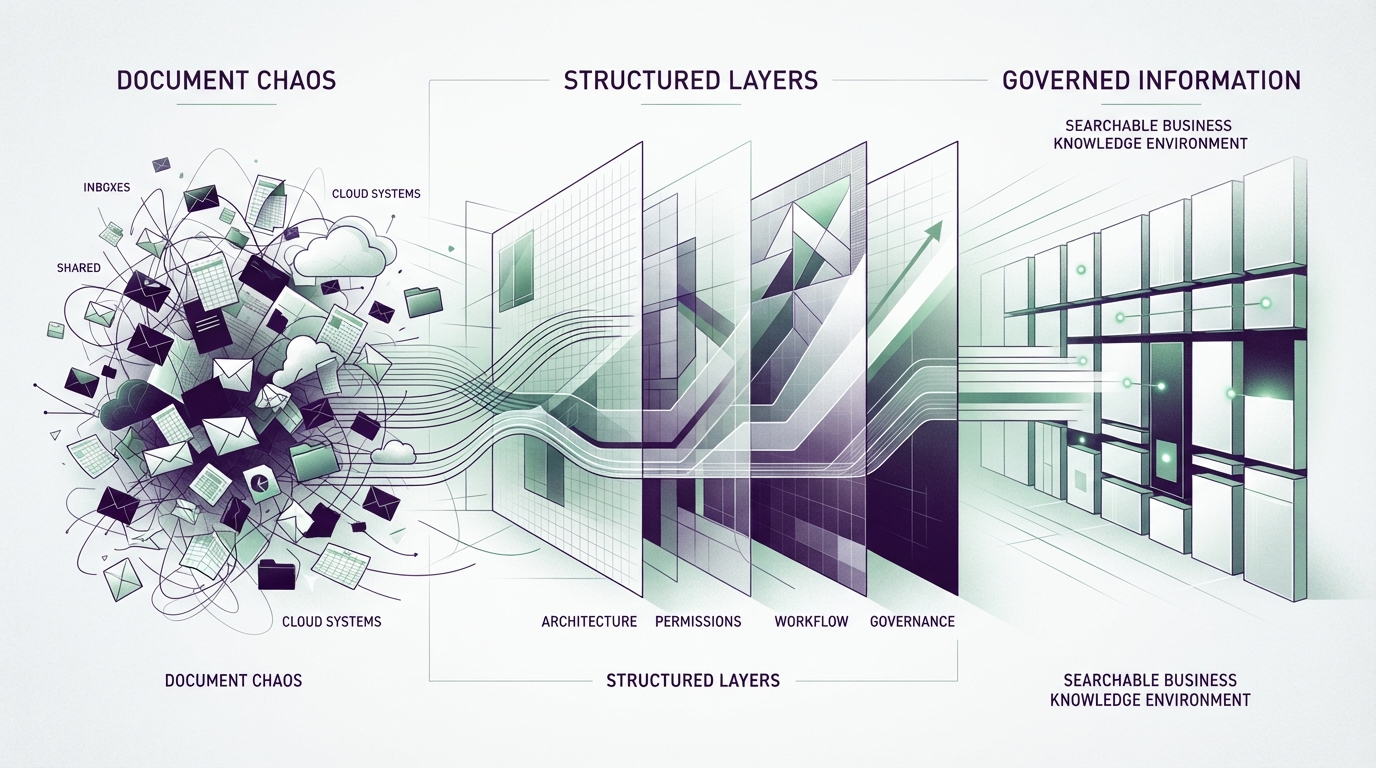
Improving document management in an accounting firm is not achieved by purchasing a single platform. It requires creating a consistent information architecture that defines where documents belong, how they are named, who can access them, how staff collaborate, how clients share information, how documents move through workflows, how versions are controlled, how information is retained and how sensitive documents are protected.
Technology helps, but document management is fundamentally a combination of information architecture, governance, workflow, security and people. Before choosing software, a firm should understand how information actually flows through the practice — and design a structure that mirrors the business.
The objective is not simply to move everything to SharePoint. The objective is to create an information environment where documents are easy to find, appropriately protected, consistently structured, easy to collaborate on, governed, connected to business workflows and ready for future automation and AI.
Why document management becomes harder as accounting firms grow
Document management problems rarely appear overnight. They accumulate gradually as a practice takes on more clients, more staff, more specialist systems and more collaboration across offices and remote locations.
Systems that worked acceptably for five people may become difficult to manage at 30, 50 or 100 staff. The number of documents grows, the number of locations where they are stored multiplies and the consistency of how they are organised decreases.
More clients and staff
More people creating, filing and sharing documents across the practice.
More specialist systems
Practice management, tax, accounting, document management and client portal systems each holding information.
More Microsoft 365 use
SharePoint, OneDrive and Teams adoption growing without consistent governance.
Multiple offices and hybrid work
Staff working from home, client sites and multiple locations creating fragmented storage.
More client portals
Different clients using different sharing methods, creating inconsistency.
More integrations
Systems that need to communicate but often do not, creating manual work between them.
Increased automation
Automation introduced without first standardising the underlying information structure.
AI adoption
AI tools interacting with unstructured, poorly governed information environments.
Accounting Firm Document Ecosystem Map
Documents do not live in a single application. They span email, SharePoint, OneDrive, Teams, practice management, tax software, client portals, local devices and cloud applications. Understanding this ecosystem is the first step toward improving it.
The common signs of poor document management
Staff cannot find the right document
When staff spend significant time searching for client files, precedents or correspondence, the problem is usually a combination of inconsistent naming, multiple storage locations and no reliable search. The business impact is wasted professional capacity and slower client response.
Multiple versions exist
Emailed attachments, local copies and shared-drive versions create uncertainty over which document is authoritative. Staff may unknowingly work from outdated versions, creating rework and risk.
Permissions are too broad
Access inherited over time — from former staff, changed roles or default sharing settings — means more people can view sensitive information than the firm intends. This creates confidentiality risk and makes governance reviews difficult.
Documents are stored in email
Email frequently becomes an unofficial document-management repository. Important attachments live in individual inboxes, are inaccessible to colleagues and disappear when staff leave. This creates business continuity risk and makes information difficult to govern.
External sharing is inconsistent
Some clients receive documents as email attachments, others through client portals, others through public links. Inconsistent sharing practices create security gaps and a poor client experience.
Different teams organise documents differently
When each team or partner maintains its own folder structure, naming convention and filing logic, the firm cannot scale. New staff struggle to find information, cross-team collaboration becomes difficult and the practice accumulates technical debt that becomes harder to fix over time.
What are accounting firms really trying to achieve?
When firm leaders say they want to improve document management, they are usually trying to achieve one or more of these business outcomes:
Find information faster
Staff locating the right document quickly without searching multiple systems.
Reduce duplicate documents
Fewer copies, versions and conflicting files across the practice.
Improve collaboration
Teams working on the same document without creating conflicting versions.
Protect sensitive information
Client financial data, tax file numbers and identity information appropriately controlled.
Improve client experience
Faster, more consistent and more secure document sharing with clients.
Reduce administrative handling
Less time spent filing, searching, attaching and re-keying document information.
Create consistent workflows
Documents flowing through standard processes rather than ad-hoc handling.
Improve leadership visibility
Clearer insight into where documents live, who can access them and how they are governed.
Support hybrid work
Staff accessing the right documents from the office, home or client sites.
Prepare for automation
Structured, consistent information that automation can work with reliably.
Prepare for AI
Governed, well-structured information that AI tools can surface usefully and safely.
Improve business continuity
Critical information accessible and recoverable regardless of staff turnover or disruption.
Design the information architecture before choosing the technology
Before migrating files or purchasing a new platform, a firm should define how information is structured. This means understanding the dimensions that matter to the practice:
Client
Which client does this document belong to?
Engagement
Which engagement, matter or service line?
Year / Period
Which financial year or reporting period?
Document Type
Tax return, financial statement, correspondence, working paper?
Status
Draft, in review, finalised, lodged, archived?
Owner
Who is responsible for this document?
Sensitivity
What level of protection is appropriate?
Retention
How long should this document be retained?
The precise structure should reflect how the firm actually works. No single folder structure is correct for every practice. The key is consistency — ensuring that any staff member can predict where a document belongs and where to find it.
LOOKUP Perspective
Good information architecture mirrors the business. Technology should support that structure rather than force the practice into an arbitrary filing model.
The role of Microsoft 365
Many accounting firms already own Microsoft 365, which includes capabilities that can contribute to document management: SharePoint for document libraries and collaboration, OneDrive for personal files, Teams for communication and file sharing, Microsoft Search for finding information across the environment, Microsoft Purview for information protection and governance, and Power Automate for workflow automation.
However, not every Microsoft 365 feature is available in every licence tier, and SharePoint should not be viewed as a replacement for specialist practice management, tax software or accounting platforms. SharePoint may provide a useful governed collaboration and document layer where appropriate, but the firm's specialist systems remain the authoritative source for specific accounting workflows.
SharePoint
Document libraries, sites, metadata, permissions and search across the practice.
OneDrive
Personal cloud storage for individual working files, with controlled sharing.
Teams
Communication, collaboration and file sharing integrated with SharePoint.
Microsoft Search
Finding information across Microsoft 365 without knowing exactly where it lives.
Microsoft Purview
Information protection, sensitivity labels, data loss prevention and retention policies.
Power Automate
Workflow automation for document routing, notifications and approvals.
Microsoft Copilot
AI assistance that works within existing permissions to help find and summarise information.
LOOKUP Perspective
Before buying another document platform, understand whether your existing Microsoft 365 environment can appropriately support the requirement. Many firms already own capabilities they are not using effectively.
SharePoint is not a filing cabinet
A common mistake is simply copying shared-drive folders into SharePoint without redesigning the information architecture. This approach migrates existing disorder into a modern platform without addressing the underlying problems.
Properly designed SharePoint document management involves planning:
Sites and libraries
Logical structure reflecting how teams and service lines actually work.
Permissions
Role-based access rather than inherited broad permissions from shared drives.
Metadata
Columns and content types that make documents searchable and filterable.
Search
Configured so staff can find documents without knowing the exact location.
External sharing
Controlled, consistent methods for sharing with clients and external parties.
Retention
Policies that govern how long documents are kept and when they are disposed of.
Information protection
Sensitivity labels and data loss prevention where appropriate.
Workflow
Automated routing, approvals and notifications connected to document lifecycle.
Poor architecture migrated into a modern platform remains poor architecture. The platform changes, but the information environment does not improve unless the structure is redesigned.
Permissions and access need active governance
Permissions are not a set-and-forget configuration. As staff join, change roles and leave, access accumulates over time. Without regular reviews, more people may have access to sensitive client information than the firm intends.
Effective permission governance involves least privilege, role-based access, structured joiner-mover-leaver processes, controlled guest and external sharing, and regular access reviews. For more detailed guidance on protecting client information, see our Protecting Client Information in an Accounting Firm guide.
Least privilege
Staff accessing only the information they need for their role.
Role-based access
Permissions assigned by role rather than individually, simplifying management.
Joiners, movers, leavers
Structured processes for granting, changing and removing access as staff transition.
Guest and external sharing
Controlled methods for sharing with clients and external parties.
Privileged access
Administrative accounts restricted and monitored.
Regular access reviews
Periodic audits confirming access remains appropriate.
Document management should support the workflow
Documents move through a lifecycle in every accounting practice. Understanding that lifecycle is essential to designing a document environment that supports rather than hinders the work.
For more on how workflow improvement reduces administrative overhead, see our Reducing Administrative Overhead in an Accounting Firm guide.
Request
Client information requested through structured channels rather than ad-hoc email.
Receive
Documents received into a controlled location, not lost in inboxes.
Classify
Documents categorised by type, sensitivity and engagement.
Review
Documents reviewed by the appropriate professional with version control.
Approve
Approval captured with audit trail where required.
Share
Documents shared with clients through controlled, consistent methods.
File
Documents filed in the authoritative location with correct metadata.
Retain
Documents retained according to the firm's retention policy.
Archive / Dispose
Documents archived or disposed of when retention periods expire.
Document Lifecycle
Documents move through a lifecycle from request to disposal. Human review, governance and security span the entire journey — not just individual steps.
Version control and the single source of truth
One of the most common document management problems in accounting firms is uncertainty over which version of a document is current. Emailed attachments, local copies and shared-drive versions create conflicting files that staff may unknowingly work from.
Modern document platforms support co-authoring, version history and controlled review — but these capabilities only help if staff are trained to use them and the firm has adopted consistent practices.
Authoritative versions
One current version of each document, stored in the agreed location.
Co-authoring
Multiple staff working on the same document simultaneously without creating conflicts.
Version history
The ability to view, compare and restore previous versions when needed.
Controlled review
Review and approval captured within the platform rather than through email.
Linking instead of attaching
Sharing links to documents rather than sending copies, reducing duplicate versions.
Avoiding attachment chains
Reducing the practice of emailing documents back and forth between staff and clients.
The business objective is not to eliminate human error entirely — it is to reduce uncertainty over which document is current and to make the authoritative version easy to find.
Secure client collaboration
How a firm shares documents with clients affects both security and client experience. Some clients prefer a client portal, others are comfortable with secure links, and some still expect email attachments. The firm's risk profile, client requirements and systems should determine the model — not a single approach applied to every client.
Client portals
Dedicated portals for secure document exchange with clients who prefer a structured interface.
Controlled external sharing
Links with appropriate permissions, expiry and access controls.
Expiring links
Sharing links that expire after a defined period based on the firm's information-sharing policy.
Guest access
Controlled guest access for external parties who need ongoing collaboration.
Identity verification
Ensuring the recipient is who the firm expects before sharing sensitive information.
Email attachment alternatives
Reducing reliance on email attachments for sensitive document exchange.
Information classification and governance
Not all documents require the same level of protection. A practical classification model helps staff understand how to handle different types of information. Common categories include public, internal, confidential and highly sensitive — but classification models should be tailored to the firm's actual information requirements, not adopted generically.
Microsoft Purview sensitivity labels can support classification, labelling and protection of documents, emails and other information. Capabilities depend on configuration and licensing. Retention policies, data loss prevention and audit capability may also contribute to information governance where appropriate.
Classification labels
Categories that help staff understand how to handle different document types.
Sensitivity labels
Microsoft Purview labels that apply protection based on document classification.
Retention policies
Rules governing how long documents are kept and when they are disposed of.
Data loss prevention
Controls that help prevent sensitive information from being shared inappropriately.
Encryption
Protection applied to sensitive documents where appropriate.
Audit capability
Visibility into who accessed, modified or shared documents.
Document management is part of AI readiness
AI systems such as Microsoft 365 Copilot operate over information the user already has permission to access within supported environments. Poor permissions, naming, structure, information quality and governance can reduce the usefulness of AI and increase oversharing risk.
AI makes information easier to discover. That makes good information governance more important, not less. Before broad AI adoption, firms should understand where sensitive information resides, who can access it, how it is shared, whether permissions are excessive and which AI tools staff are using.
For more on preparing your practice for AI, see our guides on Preparing an Accounting Firm for AI, AI Governance and Microsoft Copilot Readiness.
How this maps to the LOOKUP Business Modernisation Framework™
Improving document management follows the same structured eight-stage framework. This ensures the information environment is understood, secured and standardised before automation and AI are introduced.
Understand the current environment
Protect identities, devices and information
Remove legacy technology constraints
Create consistent systems and processes
Improve workflows and productivity
Establish governance and AI readiness
Introduce technology deliberately
Measure, review and continuously improve
Understand the current environment
Protect identities, devices and information
Remove legacy technology constraints
Create consistent systems and processes
Improve workflows and productivity
Establish governance and AI readiness
Introduce technology deliberately
Measure, review and continuously improve
Discover
Map where documents currently live across the practice's systems.
Secure
Review permissions and sensitive information to reduce unnecessary access.
Modernise
Move away from legacy constraints where appropriate, such as shared drives and local storage.
Standardise
Create agreed information structures, naming practices and classification models.
Optimise
Reduce duplicate handling, improve search and streamline document workflows.
Prepare
Establish governance for automation and AI, including permissions, classification and retention.
Implement
Migrate and deploy deliberately, with training and validation.
Improve
Review usage, searchability, permissions and workflows continuously.
What success looks like
When document management is addressed systematically, the benefits extend beyond filing. Staff find information faster, collaboration improves, sensitive information is better protected and the practice creates stronger foundations for automation and AI.
Information is easier to find
Staff locating the right document quickly without searching multiple systems or asking colleagues.
Fewer duplicate documents
Reduced copies, versions and conflicting files.
QualityControlled access
Permissions appropriate to role and sensitivity.
SecurityBetter client collaboration
Consistent, secure document sharing methods.
ExperienceConsistent document handling
Standard processes across the practice.
ConsistencyReduced administrative friction
Less time filing, searching and re-keying.
EfficiencyImproved search
Finding information without knowing exact locations.
ProductivityAI-ready information environment
Governed, well-structured information that AI tools can surface usefully and safely.
Migration without creating a bigger mess
Migration is an opportunity to improve information management, not merely relocate existing disorder. A well-planned migration should include discovery, data clean-up, duplicate review, access review, information architecture design, naming, ownership assignment, a pilot, staff communication, training and validation.
The simplistic approach of copying files from an old drive to SharePoint without any redesign simply moves the problem to a new location. The firm gains a modern platform but retains the same unstructured, hard-to-search, overly permissive information environment.
Discovery
Understand what documents exist, where they live and what is actually needed.
Data clean-up
Remove redundant, obsolete and trivial files before migration.
Duplicate review
Identify and consolidate duplicate versions.
Access review
Review and correct permissions before migrating.
Information architecture
Design the target structure before moving files.
Naming and ownership
Agree naming conventions and assign document owners.
Pilot and training
Test with a small group, gather feedback and train staff.
Validation
Confirm documents are accessible, searchable and correctly permissioned after migration.
LOOKUP Perspective
A migration is an opportunity to improve information management, not merely relocate existing disorder. Invest in the design phase before moving a single file.
Research and industry insights
Several recognised organisations provide research and guidance relevant to accounting firms seeking to improve document management, information governance and technology adoption:
CPA Australia
CPA Australia's ongoing research into digital transformation and technology adoption highlights the growing pressure on accounting firms to modernise information management and adopt digital tools that improve practice efficiency.
View source: CPA Australia Digital Technology and AI HubChartered Accountants Australia and New Zealand (CA ANZ)
CA ANZ provides guidance on how accountancy professionals can adopt emerging technologies ethically and sustainably — emphasising the importance of information governance and professional judgement.
View source: CA ANZ Ethics for Sustainable AI AdoptionMicrosoft Learn
Official Microsoft documentation on SharePoint architecture, permissions, metadata, search and information management capabilities. Capabilities vary by licence and configuration.
View source: Microsoft SharePoint DocumentationMicrosoft Learn
Official Microsoft documentation on sensitivity labels, data loss prevention and information protection capabilities within Microsoft 365.
View source: Microsoft Purview Information ProtectionAustralian Cyber Security Centre (ACSC)
Baseline security guidance relevant when designing document management controls, including access restriction, patching and backup considerations.
View source: ACSC Essential Eight Mitigation StrategiesOffice of the Australian Information Commissioner (OAIC)
Statutory guidance relevant to firms handling personal and financial information, particularly when reviewing document storage, sharing and retention practices.
View source: OAIC Notifiable Data Breaches SchemeThese organisations do not prescribe a single approach to document management. However, their guidance consistently points to the same conclusion: information architecture, governance and security should be designed before technology is deployed, not after.
What this could look like in practice
For example, an accounting firm might encounter the following challenges and work through them using a structured technology approach.
Business Challenge
A growing accounting practice has client documents scattered across shared drives, email attachments and local devices. Different teams use different folder structures. Duplicate documents are common. SharePoint permissions are broad and unreviewed. External sharing relies heavily on email attachments. Document search is unreliable. There is no consistent document classification. The firm is interested in Microsoft Copilot but concerned about information governance.
LOOKUP Approach
- Discovered where documents currently live and mapped the information ecosystem
- Designed an information architecture reflecting how the practice actually works
- Reviewed and corrected permissions to reduce unnecessary access
- Standardised naming conventions and document classification across teams
- Migrated documents into a structured SharePoint environment with metadata and search
- Implemented controlled external sharing methods to replace email attachments
- Established governance for AI usage before introducing Microsoft Copilot
- Reviewed usage, searchability and permissions continuously after deployment
Potential Business Outcomes
- More consistent document handling across all teams
- Better searchability — staff finding documents without knowing exact locations
- Reduced unnecessary access through permission reviews and role-based controls
- Improved collaboration through co-authoring and controlled sharing
- Less duplicate filing and fewer conflicting versions
- Better foundations for automation through structured, consistent information
- Better foundations for AI through governed, well-organised information
Frequently asked questions
How should an accounting firm organise its documents?
Start by designing an information architecture that reflects how the practice actually works — by client, engagement, service line, year, document type and sensitivity. Then choose the technology that supports that structure, rather than forcing the practice into an arbitrary filing model.
What is the best document management system for an accounting firm?
The best approach depends on the firm's workflow, existing systems, security requirements, integration needs and information-governance model. Many firms already own Microsoft 365 capabilities through SharePoint that can support document management, but specialist practice management and tax systems remain the authoritative source for specific accounting workflows.
Can accounting firms use SharePoint for document management?
Yes. SharePoint provides document libraries, metadata, permissions, search, version control, external sharing and workflow capabilities. However, it should be properly designed — not used as a simple replacement for a shared drive. Capabilities vary by Microsoft 365 licence.
Should accounting firms use SharePoint instead of a practice management system?
No. SharePoint is not a replacement for specialist practice management, tax or accounting software. It may serve as a governed collaboration and document layer, but the firm's specialist systems remain authoritative for specific accounting workflows.
What is the difference between SharePoint and OneDrive?
OneDrive is personal cloud storage for individual working files. SharePoint is for team and practice-wide document libraries with shared permissions, metadata and governance. Both are part of Microsoft 365 and work together, but they serve different purposes.
Should client documents be stored in email?
Email is not an appropriate document management repository. Documents stored in individual inboxes are inaccessible to colleagues, disappear when staff leave and are difficult to govern. Documents should be stored in a controlled, searchable location.
How should accounting firms control document permissions?
Use least privilege and role-based access, implement structured joiner-mover-leaver processes, control guest and external sharing, and conduct regular access reviews. Permissions should be actively governed, not set and forgotten.
Can SharePoint support external client sharing?
Yes. SharePoint supports controlled external sharing through links with appropriate permissions and expiry. However, sharing methods should be tailored to the firm's risk profile and client requirements — not a single approach for every client.
How should accounting firms handle document versions?
Use co-authoring, version history and controlled review within the document platform. Share links to documents rather than sending copies as email attachments. The objective is to reduce uncertainty over which document is current.
Should accounting firms use metadata or folders?
Both can be useful. Metadata allows documents to be tagged, filtered and searched across libraries without relying solely on folder hierarchies. The right balance depends on the firm's workflow and the sophistication of its information architecture.
How does document management affect cyber security?
Poor document management — broad permissions, uncontrolled sharing, documents in email and inconsistent storage — creates security gaps. Good document management reduces unnecessary access, improves governance and strengthens information protection.
How does document management affect AI readiness?
AI tools such as Microsoft Copilot work within a user's existing permissions. If permissions are broad, structure is inconsistent and governance is weak, AI may make information easier to discover in ways the firm did not intend. Good document management is a prerequisite for responsible AI adoption.
Can Microsoft Copilot search accounting documents?
Microsoft 365 Copilot can work with information the user already has permission to access within supported Microsoft 365 environments. It does not bypass permissions. However, if permissions are broader than intended, Copilot may make information easier to discover — which is why governance should be reviewed before deployment.
Should firms clean up documents before migrating to SharePoint?
Yes. Migration is an opportunity to improve information management. Clean up redundant files, review duplicates, correct permissions and design the target architecture before moving files. Simply copying an old shared drive into SharePoint migrates the same disorder to a new platform.
Where should an accounting firm start?
Book a Technology Strategy Session. LOOKUP will help you map your current document ecosystem, design an information architecture, review permissions and build a practical roadmap for improving document management.
What business leaders should do next
These practical steps will help your accounting firm improve document management systematically:
1. Map where documents live
Identify all the systems where client and practice documents are currently stored.
2. Identify duplicate repositories
Find where the same information exists in multiple locations.
3. Define authoritative systems
Clarify which system is the source of truth for each document type.
4. Review access and permissions
Assess whether current permissions are appropriate or excessively broad.
5. Define information structure
Design the architecture that reflects how the practice actually works.
6. Review client-sharing methods
Evaluate how documents are currently shared with clients and identify inconsistencies.
7. Identify high-friction workflows
Find the document processes that consume the most staff time.
8. Review Microsoft 365 capabilities
Understand what your existing Microsoft 365 environment can already support.
9. Clean up before migration
Remove redundant files, consolidate duplicates and correct permissions before moving anything.
10. Build an implementation roadmap
Create a practical plan covering architecture, migration, governance, training and continuous improvement.
Executive guides
Business Modernisation Framework™
The eight-stage methodology behind every LOOKUP engagement.
Business Technology Roadmap
Align technology investment with long-term business goals.
AI Governance
Develop responsible AI policies and governance.
Microsoft Copilot Readiness
Prepare Microsoft 365 for secure AI adoption.
Preparing an Accounting Firm for AI
How to prepare your practice for successful AI adoption.
Protecting Client Information
How accounting practices protect confidential data.
Reducing Administrative Overhead
How to reduce admin work through process and technology.
Preparing for Cyber Insurance
How accounting firms can prepare for cyber insurance readiness.
Building a Technology Roadmap
Build a practical technology roadmap for your practice.
How LOOKUP can help
Microsoft 365
Implement, optimise and secure your Microsoft 365 environment.
Managed IT Services
Proactive technology management that reduces downtime.
Cyber Security
Protect client information and reduce business risk.
AI & Workflow Automation
Practical automation that reduces repetitive work.
AI Readiness
Prepare your organisation for successful AI adoption.
Virtual CIO
Executive technology leadership without a full-time CIO.
AI Implementation
Deploy AI with governance and measurable outcomes.
Sources & Further Reading
The following primary and authoritative sources support the research, guidance and industry context discussed on this page:
Digital Technology and AI Hub
Guidance, research and professional development resources on digital transformation, technology adoption and AI for Australian accounting practices.
View SourceEthics for Sustainable AI Adoption
Global research exploring how accountancy and finance professionals can drive ethical and sustainable adoption of AI, emphasising information governance.
View SourceSharePoint Documentation
Official Microsoft documentation on SharePoint architecture, permissions, metadata, search and information management capabilities.
View SourceMicrosoft Purview Information Protection
Official Microsoft documentation on sensitivity labels, data loss prevention and information protection within Microsoft 365.
View SourceEssential Eight Mitigation Strategies
Baseline security guidance relevant when designing document management controls, including access restriction and backup considerations.
View SourceNotifiable Data Breaches Scheme
Statutory guidance relevant to firms handling personal and financial information in document management systems.
View SourceEvidence Standard
LOOKUP references recognised industry, government, professional and technology sources when discussing research, regulation and industry trends. Research findings are paraphrased and linked to their original sources wherever practical. LOOKUP's professional observations and recommendations are presented separately from third-party research.
This page provides business technology and governance information and is not legal, privacy, tax or regulatory advice. Organisations should obtain appropriate professional advice regarding their specific obligations.
Turn business information into a business asset
LOOKUP helps accounting firms improve document management, strengthen Microsoft 365, reduce administrative friction and build better foundations for secure automation and AI. Explore our broader technology approach for accounting firms.
Peter Kantarelis
Founder, LOOKUP — Business Technology Strategist
Peter Kantarelis is the Founder of LOOKUP and a business technology strategist helping Australian organisations modernise technology, strengthen cyber security and prepare for practical AI adoption.
He regularly works with business owners and leadership teams to improve productivity, reduce operational risk and implement technology that delivers measurable business outcomes. The LOOKUP Business Modernisation Framework™ reflects more than 25 years of helping Australian businesses make better technology decisions.