
Where Microsoft 365 and Copilot fit in a better business
By Peter Kantarelis · · Approximately five minutes
A business can have its information in Microsoft 365 and still struggle to explain how a job should be done.
The procedure might be in SharePoint, an exception in an Outlook email, and a later decision in a Teams conversation.
Someone still has to work out which instruction applies.
In my recent article, “AI should help us build a better business”, I wrote about using AI to examine the work behind a task and improve the process around it.
Microsoft 365 and Copilot can support that approach.
Their value depends partly on how deliberately we organise the information and responsibilities around them.
Microsoft 365 can hold the context people need
For a business already using Microsoft 365, some of the information an assistant needs may already be there.
SharePoint can be the agreed home for shared procedures.
Outlook and Teams can hold the correspondence and discussions that explain a particular job.
The important question is whether people can distinguish an approved instruction from an unfinished conversation.
I'd want a current procedure to identify its owner, when it was reviewed and where questions should go.
If a decision in Teams changes that procedure, someone needs to update the agreed record.
Otherwise, we're expecting each person and their assistant to reconcile the business again whenever the job comes up.
Organising that information is part of improving the work.
Copilot can help people use that context
Copilot can help with everyday preparation, including drafting documents and summarising email threads.
With the appropriate licence and configuration, it can also use work information such as files, emails and meetings to inform its responses.
Microsoft offers different Copilot experiences, so access to a chat window doesn't establish which business information it can use.
The available capabilities depend on the experience and configuration.
For a small team, being able to prepare work using relevant information inside familiar applications can be useful.
I'd still want to see which sources support an important answer.
Finding an email doesn't establish that its contents are correct or that the person writing it had authority to change the process.
A well-written answer needs checking against what the business has actually agreed.
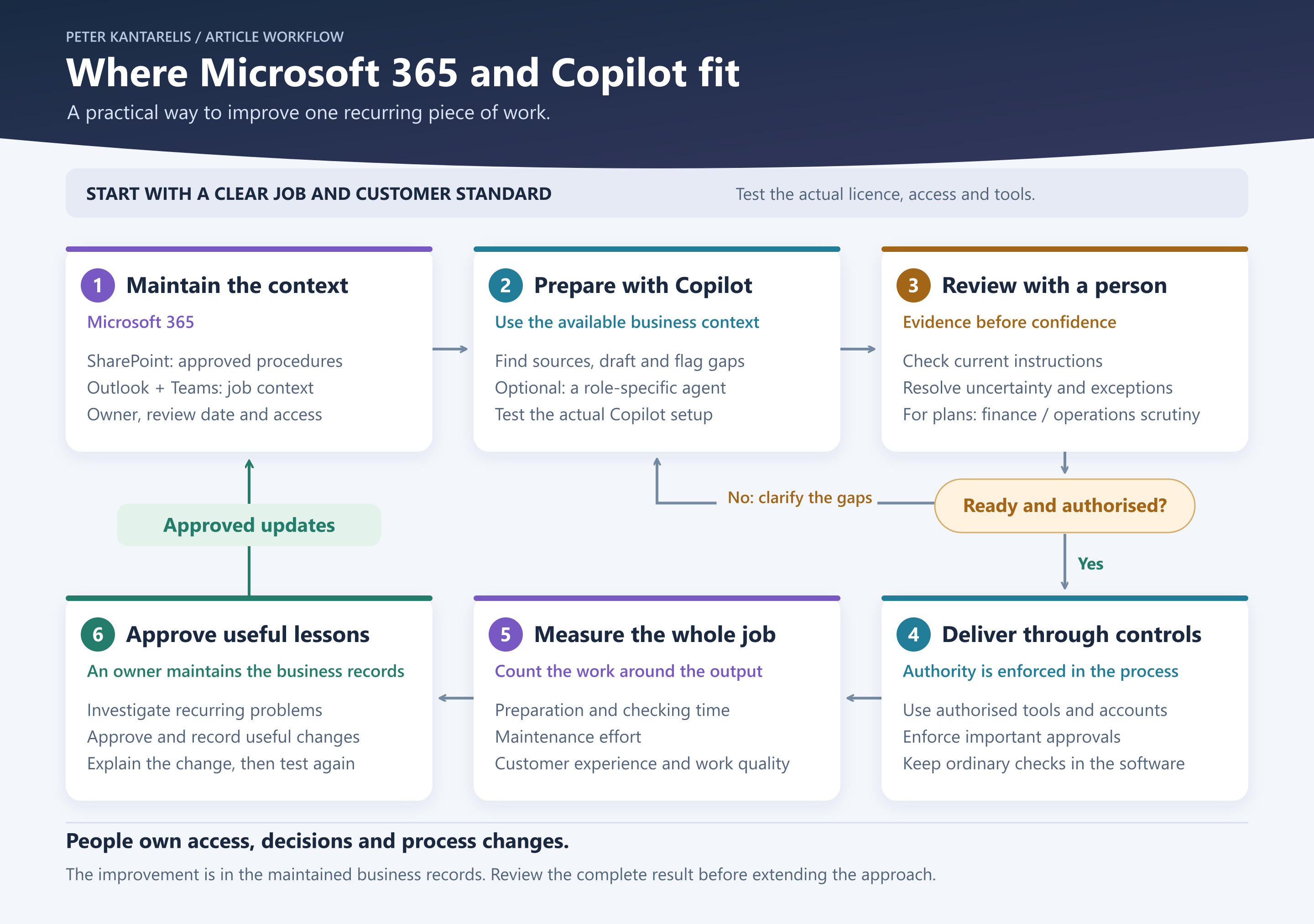
Return to the customer handover
In the earlier article, I used a hypothetical service business whose delivery team kept receiving incomplete jobs from sales.
Let's carry that example into Microsoft 365.
The team could keep its approved handover requirements in SharePoint, with an owner responsible for maintaining them.
A salesperson could ask Copilot to prepare a handover from the relevant customer correspondence and compare it with those requirements.
I'd want the draft to show what the customer confirmed, what remains uncertain and where required information is missing.
That is a proposed use to test with the actual information and Copilot setup.
I'd test whether it notices missing information and handles conflicting instructions properly.
A person would check the draft before delivery accepts the job.
Any exception would go to whoever has authority to approve it.
The useful result would be fewer incomplete handovers and less work for the customer.
We'd need to measure that, including the time spent preparing and checking the draft.
Some jobs need a more specific assistant
A general assistant may be enough for occasional preparation.
A recurring job may benefit from an agent: an assistant configured with instructions and information for a particular purpose.
Microsoft's tools support this too.
For example, Copilot Studio can use SharePoint as a knowledge source.
That gives a business a way to build an assistant around selected information.
It still needs a clear job and testing.
For the handover, I'd want to know what happens when a document is missing, two instructions disagree or the customer requests something outside the normal service.
The agent should make uncertainty visible so someone can resolve it.
Adding another assistant creates a maintenance responsibility, and that effort belongs in the assessment of whether it helps.
Access and authority need separate attention
Microsoft says Copilot works within existing permissions and access controls.
Those permissions still need to match what people should see.
If sensitive information has already been shared too broadly, respecting the existing permissions won't correct that mistake.
Connected agents need another check: which account does each connection use, and what can it do?
Copilot Studio supports different authentication arrangements for tools, including the user's own connection or credentials supplied by the agent's creator.
Finding information, preparing a change and committing that change carry different responsibilities.
I'd want important approvals enforced in the connected process.
A sentence telling an assistant to “ask first” shouldn't be the only control over a consequential action.
Where a required-field check or ordinary workflow can do the job reliably, I'd use it.
The improvement needs somewhere to go
Suppose the handover assistant repeatedly asks for information customers already supplied elsewhere.
That might reveal a retrieval problem, an unclear instruction or an unnecessary requirement.
Someone needs to investigate before changing the process.
If a change is approved, the owner updates the maintained instructions and explains it to the team.
Then we test whether the next handover improves.
That is how the business learns from working with AI.
It doesn't require the underlying model to learn permanently from every conversation.
Microsoft says commercial Copilot prompts, responses and accessed business data aren't used to train its foundation models.
The business improvement comes from what we check, approve and maintain.
The same discipline applies when Copilot helps examine a budget or a strategic plan.
A finance or operations perspective can expose questions we missed, but an AI response still needs evidence and accountable judgement.
Start with one piece of work
For a business already using Microsoft 365, I'd start by examining one recurring job in the tools people already use.
Make the current instructions clear, check access and define what help is wanted.
Then test Copilot against that job and examine the whole result.
Preparation time matters, alongside checking time, maintenance and the quality of what reaches the customer.
That gives us something concrete to improve before extending the approach.
Which recurring job in your business already has enough clear, current information for Copilot to help someone do it properly?